EVENT MANAGEMENT • TICKETING • FUNDRAISING

Run your galas, summits, and fundraisers with EventFlow.

Manage ticketing, check-in kiosks, table seating, and mobile auctions from one organized system. Use EventFlow as a standalone event tool or connect it directly with your Arcenium operations workspace.

Works Standalone or with Arcenium Hands-On Setup & Staff Training Included Mobile Guest Bidding (No App Download)
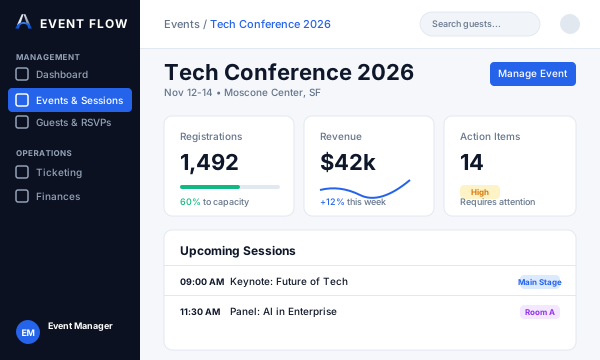
EventFlow Dashboard Interface
Event Operations Command: Review active ticket tiers, attendee check-in counts, and auction pledges in real time.

Built for organizations that host meaningful gatherings.

Whether you host an annual charity gala, corporate summit, or regional conference, EventFlow organizes the guest experience from registration through post-event follow-up.

🏛️

Nonprofits & Foundations

Maximize donor engagement with mobile silent auctions, live giving walls, and clear pledge tracking without expensive third-party ticketing platforms.

💼

Agencies & Event Planners

Deliver polished check-in kiosks, branded attendee portals, and table bundle packages for your clients' high-stakes events.

🎓

Associations & Institutions

Streamline annual conferences, alumni banquets, and regional summits with structured guest lists, badge printing, and sponsor showcases.

One organized workflow from ticket launch to final tally.

Keep your guest list, ticketing data, and event day operations connected in one clear sequence.

1

Set up tickets & packages

Configure tiered tickets (General Admission, VIP, Early Bird) and corporate sponsor table packages with reservation links for guests.

2

Collect RSVPs & arrange seating

Track registration status in real time and assign guests to tables using interactive visual seating plans.

3

Speed up arrival with kiosks

Check in guests in seconds using camera QR scanning, Ticket ID lookup, and instant walk-up registration.

4

Engage donors with mobile bidding

Guests browse silent auction lots and place bids from their smartphones—no app download required—with real-time outbid notifications.

5

Reconcile revenue & sync records

Review ticket receipts, auction proceeds, and recorded donations. Attendee profiles sync directly into your Arcenium CRM for follow-up.

Core capabilities designed for event success.

Everything your team needs to prepare, execute, and evaluate your organization's events.

🎟️

Dynamic Ticketing & Bundles

Configure custom ticket tiers, discount codes, comp passes, and corporate table packages (e.g. Table of 10) with individual guest registration links.

  • Tiered ticket pricing & promo codes
  • Corporate table bundles with seat assignments
  • Printable digital ticket confirmations
📱

Self-Service Kiosk Check-In

Keep arrival lines moving with fast QR camera check-ins, guest name lookups, and thermal badge or wristband printing.

  • Rapid camera QR code scanning
  • Ticket ID lookup & manual search
  • On-site walk-up guest registration
🏷️

Silent Auctions & Mobile Bidding

Run real-time silent auctions where guests bid directly from their mobile browser without downloading an app.

  • Web-based bidding link for all smartphone devices
  • Real-time outbid text/email notifications
  • Buy-It-Now thresholds & minimum bid increments
🪑

Table Layouts & Seating

Arrange tables visually and assign attendees to round or banquet tables with real-time capacity and dietary restriction visibility.

  • Drag-and-drop table and seat assignments
  • Table capacity tracking & VIP priority seating
  • Dietary and accessibility notes per guest
💚

Live Giving Walls & Pledges

Display live donor appreciation screens, real-time fundraising progress thermometers, and custom donor messages during your program.

  • Live digital giving wall for ballroom screens
  • Real-time fundraising thermometer towards goal
  • Public and anonymous donor contribution controls
💳

Payment Ledger & Manual Logging

Process card payments directly via connected Stripe or Square accounts. Record cash and check donations manually for unified reporting.

  • Direct Stripe & Square card processing integration
  • Manual recording of checks, cash, and sponsor pledges
  • Full CSV export for post-event financial reconciliation

Continuous data access with hands-on setup included.

Every EventFlow subscription keeps your event workspace, attendee records, and past donor bidding history accessible year-round—paired with dedicated technical onboarding and staff training.

COMMUNITY & WORKSHOPS

Starter

For regular community meetings, seminars, and training workshops.

$ 99 / month
Billed monthly
Initial Setup & Training: $250
One-time onboarding & gateway setup
250 guests included per event Up to 3 active events • Up to 5 team seats
  • Year-round attendee directory & past event records
  • Guided gateway connection & check-in setup
  • Self-service kiosk check-in with QR scan
  • Dedicated guest registration portal
  • Dynamic ticketing & table bundles
  • Stripe & Square payment gateway connection
  • Full CSV attendee and revenue data export
  • Silent auctions & mobile guest bidding
  • Live giving walls & donor thermometers
  • Custom white-label branding
SCALE • WHITE-LABEL

Premium

For large institutions and organizations hosting high-capacity conferences and galas.

$ 299 / month
Billed monthly
Initial Setup & Training: $750
One-time VIP onboarding & hardware validation
1,000 guests included per event Unlimited active events • Unlimited team seats
  • Everything in Pro, plus:
  • Multi-kiosk hardware staging & badge printer validation
  • Multi-year data retention & custom trend reports
  • Custom white-label branding (logo & styling)
  • Public directory listing option
  • Dedicated event-readiness review call
  • Attendee data import assistance
  • Priority technical support during event windows
Need more guest capacity for a major gathering? Volume-discounted overage protection is automatically applied starting at $0.20 down to $0.05 per additional attendee.
TECHNICAL READINESS • NO UNTRAINED VOLUNTEERS

Why every subscription includes guided onboarding & staff training

Live galas, auctions, and check-in desks do not get second chances. We charge an initial setup fee because our technical team works directly with you to stage equipment, connect merchant accounts, build seating plans, and train your staff before doors open.

Merchant Gateway Connection

We connect and test your organization's Stripe or Square account. Ticket revenue and donations route directly to your bank account with zero platform commission markups.

Venue Seating & Floor Plans

Our specialists configure your visual venue layout—mapping banquet tables, VIP sponsor blocks, and dietary preferences so seating is locked and organized in advance.

Kiosk Hardware Staging

We stage check-in tablets, test QR scanners, and configure badge printing workflows with offline caching to guarantee zero registration bottlenecks at entry.

1-on-1 Staff & Volunteer Training

We conduct a live hands-on walkthrough with your team and volunteers, reviewing attendee lookups, card swipes, silent auction bidding, and closing check-out procedures.

ANNUAL DISCOUNT BENEFIT Organizations choosing annual billing receive 50% off their initial onboarding and setup fee across all tiers.

Frequently asked questions about EventFlow.

Clear answers about compatibility, payments, synchronization, and plan selection.

Does EventFlow require an Arcenium core platform subscription?

No. EventFlow works completely independently as a dedicated event management and fundraising platform. If your team also uses the Arcenium operations platform, you can connect the two so attendee lists and event contacts flow directly into your core CRM.

Are EventFlow prices additional to core Arcenium platform fees?

Yes. EventFlow is a modular product with its own monthly subscription and initial setup fee. If you subscribe to Arcenium's core operations workspace, EventFlow is billed as an interconnected module. If you do not use Arcenium, EventFlow functions as a completely standalone system.

How does payment processing work? Are there extra fees?

Ticket sales and credit card donations are processed directly through your own connected Stripe or Square merchant account. Standard payment processor processing fees (such as Stripe's standard 2.9% + 30¢ per transaction) apply directly to your processor account. Arcenium does not charge hidden per-transaction platform commissions.

How are cash and check donations handled?

EventFlow provides manual entry tools so your staff can log cash contributions, mailed checks, and verbal donor pledges directly into your event ledger. This provides a unified tally across card and offline gifts. The system does not automatically deposit or clear physical checks or cash.

Why does EventFlow require a monthly subscription and an initial setup fee?

Successful live events require real technical preparation—merchant payment testing, kiosk hardware staging, visual floor plan mapping, and dedicated volunteer training. We charge an initial setup fee because our technical team actively assists your organization with setup and conducts live training before doors open, ensuring you never face technical glitches on event night. The ongoing monthly subscription maintains permanent, secure access to your attendee directory, donor histories, and past auction bidding data year-round, so you never lose critical donor insights between annual events.

Which records synchronize with the Arcenium core platform?

When connected to Arcenium, attendee contact details (names, emails, organizations), ticket categories, and transaction summaries automatically sync with your Arcenium client directory and CRM, making post-event project follow-ups seamless.

See how EventFlow can support your next event.

Schedule a focused walkthrough with our team. We will review your event format, ticketing structure, and fundraising goals to ensure EventFlow fits your needs.

Ticketing & Kiosk Review: Walk through table packages, attendee check-in flows, and badge printing options.
Mobile Auction & Giving Walkthrough: See how attendees bid on smartphones and how live donor walls display in the room.
Onboarding & Hardware Staging Plan: Learn how our team configures your merchant account, seating layout, and volunteer training schedule.

Book an EventFlow Demo

Tell us about your upcoming event and we will reach out to schedule a demonstration.